Changelog
What's new
User-facing changes to GPT Master, newest first.
v2.23.0
- New Extension UI now matches ChatGPT's display language automatically — 19 languages supported including Spanish, French, German, Japanese, Korean, Chinese, Portuguese, Vietnamese, Arabic, Hindi, and more.
- New Dismissing the review prompt twice now permanently suppresses it.
- Changed Review prompt now only appears at meaningful moments (prompt enhanced, prompt library insert, side chat thumbs-up) — passive page-load triggers removed.
- Fixed Review prompt is suppressed for 7 days after a negative experience (errors, quota blocks, thumbs-down).
v2.22.2
- Fixed Note button on messages now uses a sticky-note icon — no more visual confusion with ChatGPT's native Edit button.
- Fixed Service-worker startup no longer fires repeated 401 noise events; session is now refreshed before hydration.
- Fixed "Right Rail" renamed to "Right Panel" in settings.
v2.22.1
- New Side Chat automatically retries with a fallback AI model when the primary provider is unavailable, reducing failed requests.
- Changed Free-tier prompt library limit raised from 5 to 10.
- Fixed Prompt Enhance reliability significantly improved after high error rates were detected in production.
- Fixed Analytics events from background services now reach tracking correctly.
v2.22.0
- New Feature-discovery carousel walks new users through key GPT Master features on first install.
- New Post-uninstall feedback survey — a short form opens after you remove GPT Master.
v2.21.0
- New Activity tracking shows your GPT Master usage at a glance, with an in-app feature tour to discover what's available.
- New Prompt variable filling — add {{placeholders}} to saved prompts and fill them in before inserting.
v2.20.0
- New Side Chat answers now have thumbs up/down rating buttons for quick feedback.
- Changed Prompt Enhance is now fully rolled out to all users.
v2.19.9
- Fixed Prompt Enhance no longer returns your message unchanged when it references prior conversation context. It now resolves the reference and rewrites it as a self-contained prompt.
v2.19.8
- Changed Internal improvements to the Prompt Enhance pipeline for output quality, routing reliability, and safety. Feature remains temporarily disabled.
v2.19.7
- Changed Prompt Enhance temporarily disabled while backend improvements are in progress.
v2.19.6
- Fixed Prompt Enhance button now shows a pulsing green dot on first visit; clicking it dismisses the badge.
v2.19.5
- Fixed Speed Booster banner now appears inline in the page header instead of floating over chat content.
- Fixed Timestamps, bookmarks, and notes now anchor to the actual answer in reasoning turns instead of the thinking preface.
- Fixed Minimap entries now show a two-line snippet preview for easier scanning.
v2.19.4
- Changed Prompt enhancement now shows animated progress copy ("Analyzing…" / "Drafting…" / "Polishing…") and produces smarter context-aware rewrites: short acknowledgements pass through unchanged while prompts with conversation context get richer rewrites.
v2.19.3
- Changed Prompt enhancement uses a higher token budget for richer suggestions and a longer timeout for better reliability.
v2.19.2
- Fixed Speed Booster no longer shows a stale "earlier messages hidden" banner when switching from a long conversation to a short one.
- Fixed Jump-to-message now reliably scrolls and highlights the correct message even after ChatGPT re-renders the conversation.
v2.19.1
- Changed Welcome screen now lists Side Chat and Prompt Enhance as available features, with hover descriptions on each row.
- Fixed Free tier weekly caps for Prompt Enhance and Side Chat corrected to 30/week; upsell modal now accurately reflects the limit.
v2.19.0
- New Prompt enhancement is now available to all users. Click the wand icon to get an AI-improved version of your prompt before sending.
- Changed Prompt enhancement switched to Qwen3.6 Flash for faster, higher-quality rewrites.
- Changed Free-tier limits updated with clearer comparison between free and premium.
v2.18.3
- New Side Chat now shows an inline question input directly below selected text. Type and press Enter without leaving the page.
- New Amber nudge dot on the Side Chat tab lets existing users discover the feature; dismisses on first click.
- Changed Replaced react-markdown with a lighter built-in renderer, shrinking the extension bundle.
- Changed Welcome page bundle reduced from 735 KB to 58 KB.
- Fixed Side Chat no longer sends blank context when ChatGPT wraps conversation turns in non-sibling DOM subtrees.
- Fixed Timestamps, bookmarks, notes, and save buttons now reappear correctly after editing and cancelling a ChatGPT message.
v2.18.2
- New Signed-out users can include an optional reply-to email when leaving feedback.
- Changed Side Chat sends on Enter; Shift+Enter inserts a newline.
- Fixed Side Chat and Prompt Library packs were failing with CORS errors due to a missing Cloudflare Worker route. Both endpoints now route correctly.
- Fixed Side Chat now answers in the language of your question instead of the browser's UI locale.
- Fixed Server-side feature flag kill switches now apply on first load. The data service no longer starts before flags hydrate.
v2.18.0
- New New Side Chat panel in the right rail. Highlight any text in a ChatGPT response and ask a follow-up about that selection without losing your spot. Streaming answers, markdown rendering, chat-bubble layout.
- New Side Chat is the first tab in the right rail, so it's one click from any conversation.
- New Free tier includes 20 Side Chat questions per week.
- Fixed Side Chat quota copy reads correctly and selection sanitization is hardened against edge-case input.
v2.17.1
- New Prompt Library Packs now show a "New" badge when there are unread packs.
- Fixed Minimap jump now lands on turns that weren't fully loaded yet. Positional fallback kicks in when the message-ID lookup misses a detached unhydrated turn.
- Fixed Minimap jumps on edited or branched conversations no longer silently land on the wrong turn. They fail gracefully so the jump can be retried.
- Fixed Conversation data is captured earlier on page load so the minimap populates correctly from the first visit.
v2.17.0
- New New "Summarize a document" seed prompt in the Prompt Library starter set.
- New Friendlier empty state for the Prompt Library: a clear "Create your first prompt" call to action replaces the empty placeholder row.
- Changed "Library full" replacement dialog renamed to "Saved Prompts limit reached" with tighter copy.
v2.16.0
- New Upgrade button in the right rail footer for free users. Opens the upgrade modal directly from the sidebar.
- New Back button on the review prompt feedback screen. Returns to the main gate view without dismissing the prompt.
- Changed "Cancel anytime" reassurance now appears below the upgrade CTA in the upsell modal and account section.
- Fixed Upsell modal no longer overlaps the whisker tab bar. Overlay stacking corrected.
- Fixed Speed Booster scroll reveal retries when the target message hadn't rendered yet. No more landing at the wrong position.
v2.15.1
- New First-use hints in the Prompt Library guide you to save prompts. Dismiss once seen, never shown again.
- Fixed Prompt Library palette no longer shows a redundant footer or duplicate "New" button. Cleaner interface.
v2.15.0
- New Save-as-prompt button in the per-message toolbar. Save any ChatGPT response to your Prompt Library in one click, with smart auto-labelling.
- New Composer // placeholder hint teaches the Prompt Library trigger at first use. Fades after the palette is opened once.
- New Minimap weekly cap for free tier (100 jumps/week). A cap modal with upgrade prompt appears when the limit is reached.
- New Admin Hub restructured with tabbed sections: General, Library, Account, and Help replace the previous flat layout.
- Changed Prompt palette is wider, uses brand-green accent, and consolidates shortcuts and Manage button into a clean footer strip.
- Fixed upsell_shown analytics event no longer fires for anonymous and pro users who never see the modal.
- Fixed Sidebar no longer shows the native ChatGPT Recents header above the GPT Master sidebar.
v2.14.2
- New In-page review prompt for Legacy Dark Mode users. Appears after 3 page loads with the setting enabled.
- Fixed Minimap navigation now scrolls to the correct conversation turn instead of jumping to the top of the page.
- Fixed Timestamps no longer flicker from a spurious refetch loop triggered by React className mutations.
v2.14.0
- New Legacy Dark Mode toggle in Quick Controls. Restores the pre-OLED gray background if the OLED update isn't to your preference.
- New Minimap conversation data service is now live for all users, powered by API-intercepted message data with persistent cache.
v2.13.0
- New Conversation data service captures ChatGPT API responses to power more accurate minimap rendering. Rolling out gradually via feature flag.
- Fixed Minimap cache writes are serialized to prevent data corruption from overlapping bookmark operations.
- Fixed Minimap cache is now cleared on sign-out even when no ChatGPT tab is open, preventing stale data from persisting across sessions.
v2.12.2
- New Prompt Library is now available to all users.
- New Anonymous users can browse the Prompt Library palette without signing in. Sign-in is only required to create, select, or delete a prompt.
- New Upsell modal redesigned with updated plan comparison and support for annual and weekly billing intervals.
- Changed Upgrade button opens the upsell modal directly in the chat window.
- Fixed Weekly billing interval no longer displays as "Annual" in the Plans section.
- Fixed Prompt Enhance now preserves line breaks from multi-line prompts.
v2.12.1
- New Prompt Library: live search filter in slash-mode. Type //filter in the composer to narrow the palette instantly.
- New Prompt Library: result count badge in the palette header and keyboard shortcut hints (↑↓/↵/esc) at the bottom.
- New Prompt Library: starter prompts seeded on fresh install so the palette is never empty.
- Fixed Upsell modal now renders above the prompt library palette instead of behind it.
v2.12.0
- New Prompt Library: save, organize, and insert reusable prompts from a searchable palette. Type // to open the palette inline while composing. Gradually rolling out.
- Changed Feature flags now support percentage-based gradual rollout for safer staged releases.
v2.11.8
- Fixed Feature flag refresh throttle now slides correctly on 304 Not Modified responses, preventing flags from going stale between sessions.
v2.11.7
- New Prompt Enhance extracts a conversation summary before rewriting your prompt, improving rewrite quality in long chats.
- New Compare modal redesigned with a cleaner, more readable side-by-side layout.
- Fixed Text containing "Show more" or "Show less" no longer incorrectly stripped from conversation content during prompt enhancement.
v2.11.6
- Fixed Fixed a race condition in feature flag initialization that could cause repeated service worker restarts.
v2.11.5
- Changed Welcome page plan comparison table reworked with clearer anon/free/pro columns and updated sign-in button copy.
- Changed In-page review prompt polished with updated heading and a Chrome Web Store button with icon.
- Fixed Clarified the "already reviewed" button label in the in-page review prompt.
v2.11.4
- New In-page review prompt surfaces after delight moments (bookmark jumps, follow-up clicks, bulk actions) to ask if GPT Master is working for you.
- Changed Long Chat Speed Optimizer can now be toggled directly from the power panel, not just Admin Hub.
- Fixed Anonymous users who hit their lifetime usage limit now see a sign-in nudge instead of the free-tier upgrade prompt.
v2.11.3
- New Prompt Enhance now shows a compare modal so you can review the rewrite side by side with your original and accept or reject it before it replaces your input.
v2.11.2
- New Multi-select now uses a hover-checkbox pattern: hover a conversation to reveal a checkbox, click to enter selection mode, then use the context menu for bulk actions.
- Fixed Follow-up suggestions now work with all AI models, including those that omit the wrapper tags in their responses.
- Fixed Power button and sidebar whiskers now stay correctly positioned when ChatGPT's native sidebar opens or closes.
v2.11.1
- Changed Prompt Enhance now recognizes casual or already-clear prompts and sends them through unchanged, skipping unnecessary rewrites.
- Changed Prompt Enhance rewrites are more useful on complex and detailed prompts, with low-confidence specifics shown in [brackets] for easy review.
- Fixed Prompt Enhance no longer rewrites casual questions in a formal or corporate tone.
v2.11.0
- New Prompt Enhance: a new button in the ChatGPT composer rewrites your prompt with AI before you send it, with one-click undo.
v2.10.2
- Changed Minimap jumps are now unlimited for free plan users. The weekly cap introduced in v2.10.1 has been removed.
v2.10.1
- New Free plan now includes 20 minimap jumps per week, with a counter and upgrade prompt when the weekly limit is reached. Pro stays unlimited.
- Changed Follow-up suggestion limits now reset weekly instead of daily (5/week for anonymous, 20/week for free).
- Changed Free plan limits adjusted to 8 folders and 4 stars, notes, tags, and bookmarks each.
- Fixed Toast notifications no longer get clipped or pushed off the side of the screen.
- Fixed Sign-in prompt dialog now displays in the correct position.
v2.10.0
- New Pro plan is now available as a monthly or annual subscription. Upgrade from the Plans section inside the extension.
- Changed Plans section shows your active subscription status, next renewal date, and a link to manage billing.
- Changed Grandfathered Pro users see a note explaining their access, with options to start a monthly or annual subscription.
- Changed Checkout and billing errors now appear inline so you know what went wrong instead of seeing a silent disabled button.
v2.9.6
- New Review prompt now walks through a multi-step flow: rate, then leave a Chrome Web Store review or submit feedback, then see a confirmation. Your rating is saved so reloading mid-flow brings you back to the right step.
- New Bulk tag assignment is now available from the folder context menu, with a submenu that repositions itself to stay on screen.
- Changed Minimap scroll-to-item uses a smoother animation that adjusts each frame to absorb layout shifts while scrolling.
v2.9.2
- New In-app review prompt for engaged users who have been using GPT Master regularly.
v2.9.1
- New New folders now start with Work (blue) and Personal (green) as defaults instead of generic placeholders.
- Changed Message navigation buttons in the power button are temporarily hidden pending a UX update.
- Fixed Message navigation scroll now correctly accounts for the sticky header.
v2.9.0
- New Previous/next user-message navigation buttons in the power button for faster movement through long chats.
- Changed Upgrade prompts now appear consistently when free-tier limits are reached for bulk actions, bookmarks, notes, and tags.
- Fixed Drag-and-drop folder assignment no longer double-runs conversation moves in affected flows.
v2.8.0
- New Delete conversations from the right-click menu or the bulk action bar.
- New Long Chat Optimizer: only nearby messages are rendered in long conversations, reducing memory use. Toggle it in Admin Hub under Performance.
- Fixed Minimap depth level is now saved and restored between sessions.
- Fixed Clicking a note card now scrolls to the correct message.
v2.7.0
- New Tags: create tags, assign them to conversations, and filter the sidebar by tag.
- New Tag management in Admin Hub: rename, recolor, delete, and bulk-manage tags.
- New Tag search in the tag picker for quick assignment across large tag sets.
v2.6.0
- Changed Consistent light and dark mode theming across the popup, Admin Hub, and Quick Controls.
- Changed Settings button now opens ChatGPT in a new tab when no ChatGPT tab is active.
- Fixed Floating power button no longer overlaps with the ChatGPT UI.
- Fixed Folder color swatches are easier to distinguish.
v2.5.0
- New Welcome page for new users with clear sign-in and skip options.
- New You can now use GPT Master without signing in (limited features).
v2.4.0
- New Right-click menu on conversations with Copy Link, Move to Folder, Add Note, and View Details.
- New Conversation Details panel showing title, model, message count, folder, and dates.
- New "Add child folder" option in the folder right-click menu.
- New Indent guide lines in the sidebar for easier depth scanning.
- Changed Folder color dot is always visible, using a default color when none is set.
v2.3.2
- New Expand or collapse all folders at once from the right-click menu.
- Fixed Star toggle no longer flashes when toggled.
v2.3.0
- New Notes: write notes on conversations, highlight key passages, and dock notes to the side panel.
- New Pro plans section in the Admin Hub with tier details and feature overview.
- Fixed Conversation titles now stay up to date when you rename chats in ChatGPT.
v2.2.0
- Fixed Discount codes now apply correctly during upgrade checkout.
- Fixed Timestamps show AM/PM consistently.
v2.1.0
- New WhiskerTabs: a floating tab strip on the right edge to open the side panel without covering content.
- New GPT Master logo on the power button and side panel footer.
- Fixed Sidebar now works correctly in non-English ChatGPT interfaces.
v2.0.0
- New Pro tier subscription: unlock unlimited folders, stars, and enhanced follow-ups.
- New In-app upgrade screen with feature comparison and pricing.
- New Free tier: 5 folders, 10 stars, and limited daily follow-up suggestions.
- New First-run onboarding walkthrough for new users.
- New Redesigned side panel with a drag handle and collapse button.
- New In-extension feedback form in the Admin Hub.
- Changed Power button hides automatically when the side panel is open.
v1.1.0
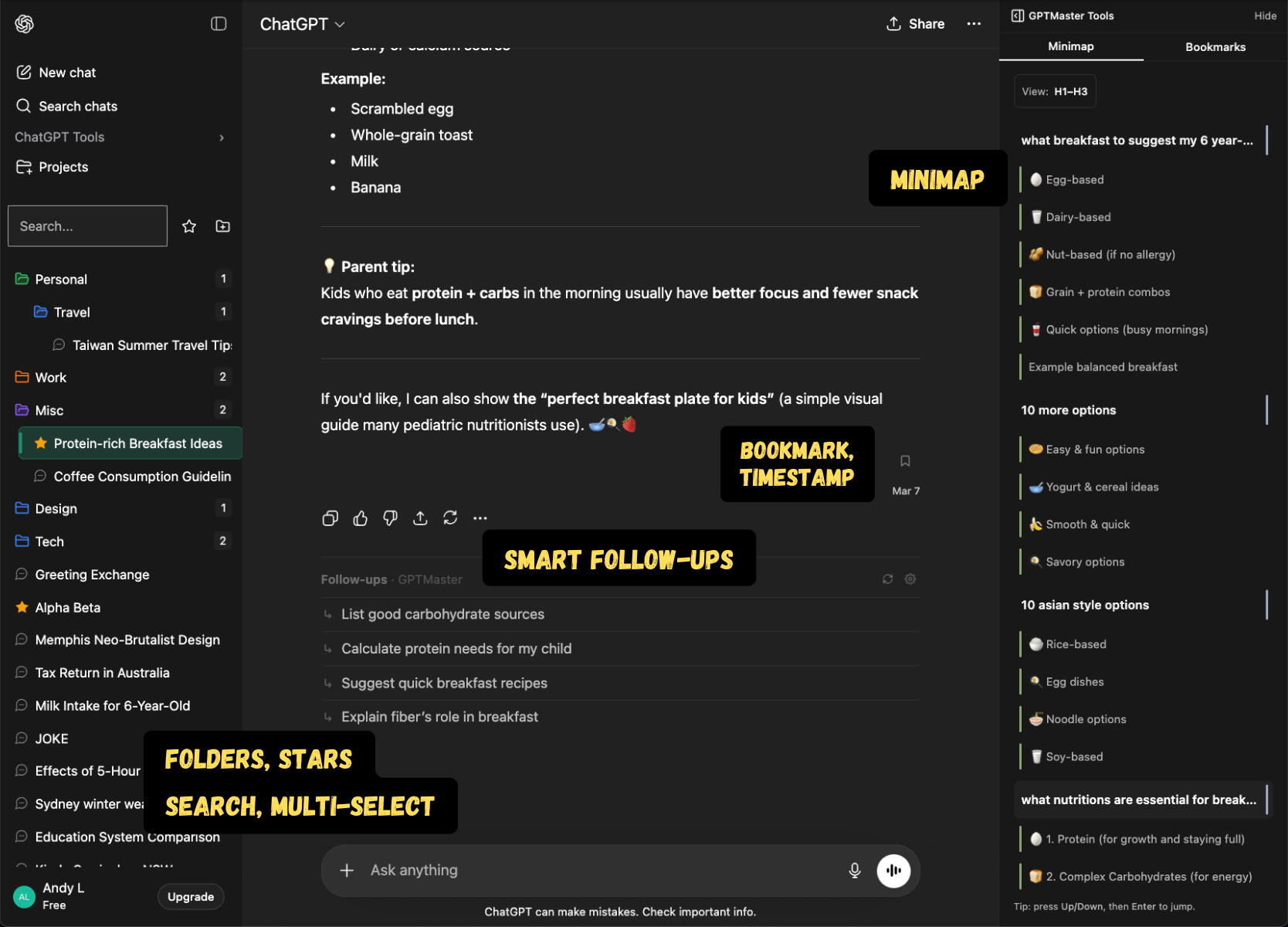
- New Folder color picker: assign custom colors to folders for faster visual scanning.
- New Collapse the native ChatGPT tools section with a toggle.
- Fixed Active chat highlight stays visible when switching conversations.
- Fixed Folder expansion state is restored after toggling the starred filter.
- Fixed Folder counters now show direct child counts only.
v1.0.1
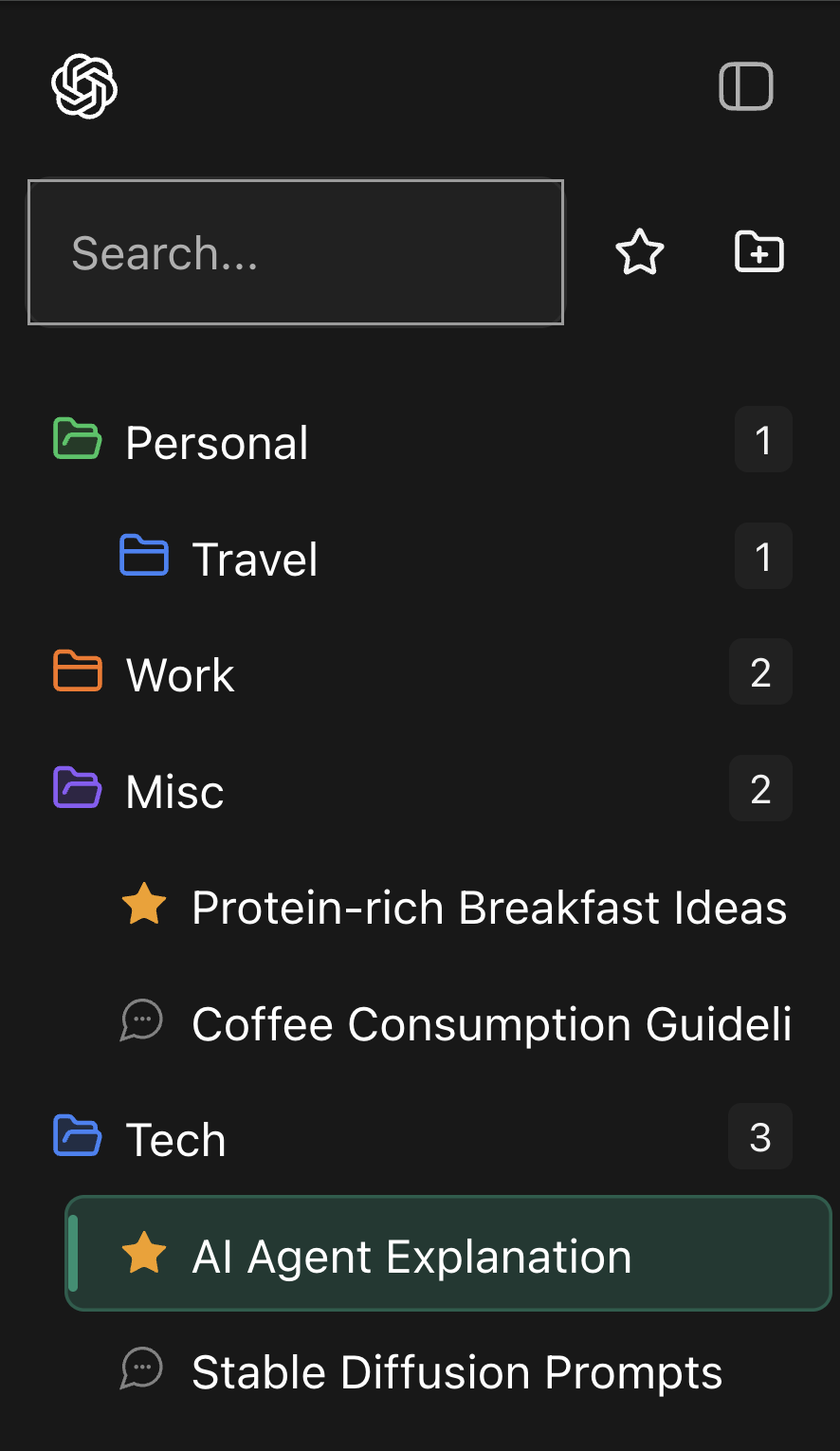
- New Popup Control Center with account snapshot and quick actions.
v1.0.0
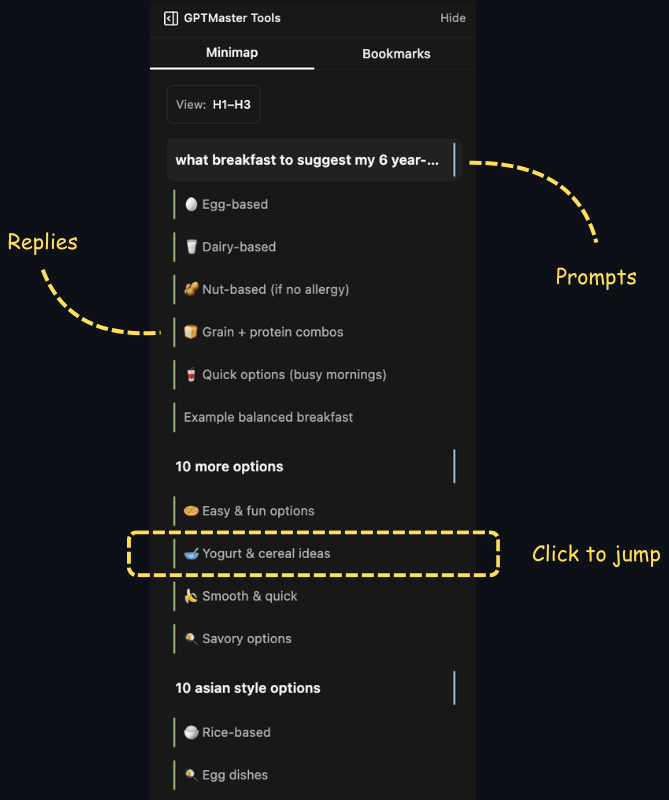
- New Conversation minimap for jumping to any point in long threads.
v0.11.0
- New Multi-select conversations with Cmd/Ctrl and Shift, plus bulk star and archive.
- New Undo for destructive actions (delete, move) with a toast and keyboard shortcut.
- New Bookmark messages inside ChatGPT conversations, with a dedicated bookmarks panel.
v0.10.0
- New Sign in with Google to sync your settings and access your account.
- New Account section in settings with sign-in/sign-out and plan info.
- Changed Sidebar now requires a GPT Master account before showing organization features.
v0.9.0
- New Consent prompt before enabling enhanced follow-up suggestions.
- Changed Follow-up suggestions are now more accurate, with automatic fallback if the service is unavailable.
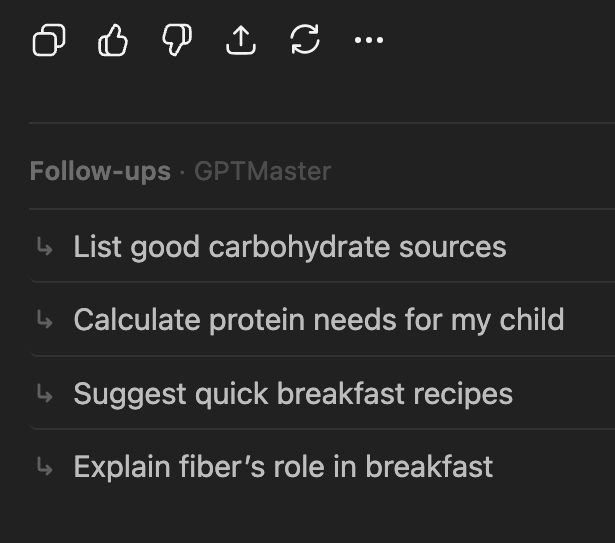
- Changed Refreshed follow-up UI with a header, row-style suggestions, and cleaner loading state.
v0.8.2
- Changed Follow-up chips now appear in a horizontal row instead of a vertical stack.
- Changed Smarter follow-up suggestions that vary based on conversation context.
- Changed Softer folder icons and improved dark mode styling.
v0.8.0
- Changed Follow-up suggestions reworked with dynamic prompts tailored to each conversation.
v0.7.0
- New Settings page for configuring GPT Master.
v0.6.5
- New Rename conversations inline or from the right-click menu.
v0.6.4
- New Archive conversations with one click.
- New Follow-up suggestions in your language (English, French, Chinese, Vietnamese).
v0.6.3
- New Default folders created automatically on first use.
v0.5.0
- New Follow-up suggestions to help you continue conversations.
v0.3.0
- New Improved folder tree with better hierarchy and interactive star toggling.
v0.2.0
- New Drag and drop conversations into folders.
v0.1.0
- New First release of GPT Master: folders and basic conversation organization for ChatGPT.