Skip to content

ChatGPT conversation notes

Add conversation notes so important ChatGPT threads keep their context

GPT Master lets you attach conversation notes to the threads that matter most, so you can save reminders, context, and next steps without copying everything into another app.

  • Local-first organization inside ChatGPT
  • Folders, search, timestamps, and navigation in one layer
  • Fast setup with no account required for core features

Quick answer

GPT Master lets you attach conversation notes to the threads that matter most, so you can save reminders, context, and next steps without copying everything into another app.

chatgpt.com
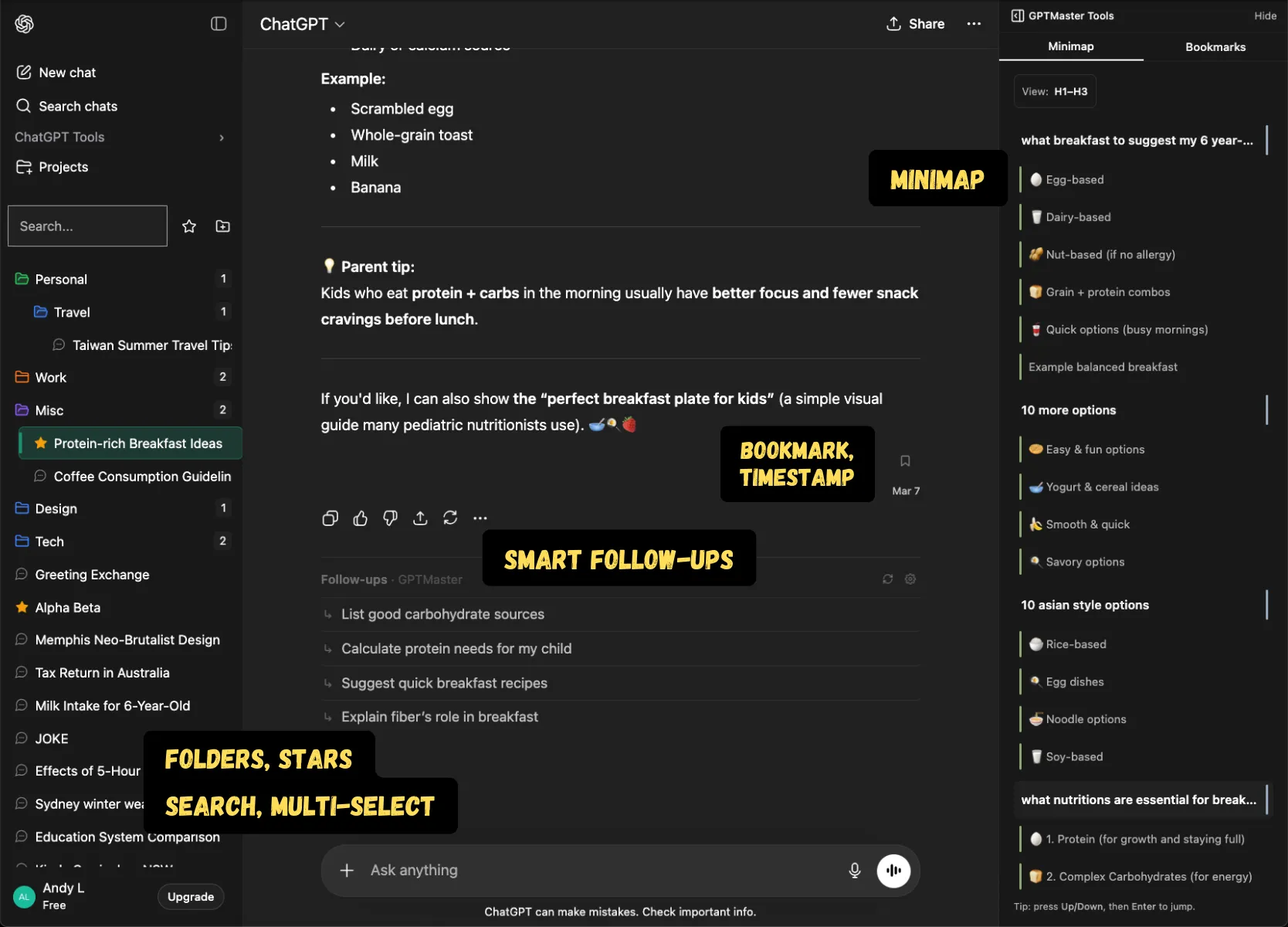
GPT Master inside ChatGPT showing organized conversations and additional workflow controls

Shown inside chatgpt.com: GPT Master adds structure without forcing a separate workspace or a new learning curve.

Native friction

Why notes matter in ChatGPT workflows

  • Useful conversations lose context once you step away from them for a few days.
  • Thread titles alone do not explain why something mattered, what decision was made, or what to do next.
  • Copying notes into a separate tool breaks flow and makes ChatGPT harder to reuse as a working archive.

What changes

What GPT Master adds

  • Attach notes directly to important conversations instead of relying on memory.
  • Save reminders, decisions, and next steps where you will actually see them again.
  • Pair notes with folders, stars, and timestamps so your archive stays structured and understandable.

How it works

How conversation notes fit into daily work

Conversation notes help bridge the gap between a useful thread and a reusable workflow. They are especially helpful when a conversation carries hidden context that you do not want to rediscover later.

  1. 1

    Add a short note when a conversation becomes important enough to revisit later.

  2. 2

    Use the note to capture what the thread is for, what was decided, or what still needs to happen.

  3. 3

    Combine notes with stars or pins so the highest-value threads stay visible and self-explanatory.

Who this page is for

Common ways people use GPT Master

The strongest SEO page is still useful to a real buyer. These are the day-to-day jobs this workflow solves once ChatGPT becomes part of your actual operating system.

  1. 01

    Consultants recording client context before returning to a strategy thread.

  2. 02

    Founders saving next steps on hiring, fundraising, or product conversations.

  3. 03

    Researchers marking why a synthesis thread matters before reopening it later.

Frequently asked

Questions people have before they install

These questions cover fit, workflow, and what to expect before installing GPT Master, so people can understand the feature in practical terms before clicking through to the Chrome Web Store.

Why add notes to ChatGPT conversations?

Because the value of a thread is often not obvious from the title alone. Notes preserve the missing context that makes a conversation worth reopening later.

Are conversation notes better than copying everything into Notion?

For quick workflow context, yes. Notes keep the explanation attached to the thread inside ChatGPT, while external docs are better for polished deliverables or shared knowledge bases.

Who benefits most from conversation notes?

Anyone managing many active threads across projects, clients, or research topics who needs a lightweight way to remember why a conversation matters.